Printable Ticket Template
Use template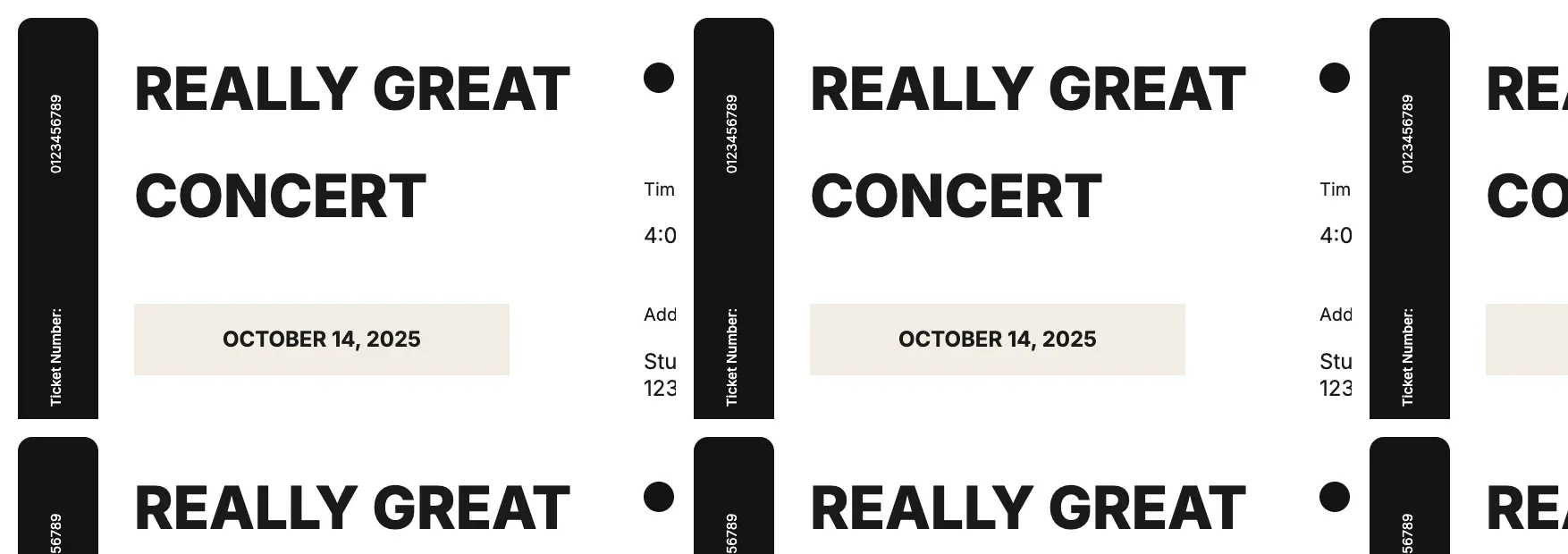
About Printable Ticket Template
Events need tickets that look organized and are easy to verify at the door. A printable ticket gives each guest a numbered pass with the date, venue, and seat details clearly shown, so entry stays smooth for raffles, concerts, or fundraisers.
Our printable ticket template covers event name, date, venue, seat or admission number, and a tear-off stub, with space for your branding. Fill it in through the OnlyDoc editor and print a full batch in minutes.
Frequently asked questions
What is a printable ticket template?
A printable ticket is a ready-made pass for events, raffles, or entry that you print rather than scan on a phone. The template gives you the layout, numbering, and fields already placed, which saves effort and keeps every ticket consistent. You personalize the details and download the finished set.
When should you use a printable ticket template?
Use it for concerts, raffles, fundraisers, movie nights, or any event where guests need a physical pass. Whether you need one ticket or hundreds, the template fits both. You open it, update the event details, and download a clean, finished version whenever you need it.
What should be included in a printable ticket template?
At minimum it covers the event name, date, time, venue, admission or seat number, and a tear-off stub for verification. Each part is laid out for you, so you focus on the event details rather than formatting, and the finished ticket stays clear and easy to check at the door.
Who can use a printable ticket template?
Event organizers, schools, nonprofits, and small business owners running raffles or shows benefit most from it. Whether you print a handful or hundreds, the template saves time and keeps every ticket consistent. Because it is easy to adapt, first-time organizers can produce a polished set just as confidently as experienced ones.
Should printable tickets have unique numbers?
Yes, numbering each ticket helps you track attendance and prevents duplicate entry, especially for raffles where a number determines the winner. Our template includes a number field you can update for each copy, so you keep an accurate count and avoid disputes at the door.
Can I add a logo to a printable ticket?
Yes, our template leaves space for a logo or event image alongside the text fields. Adding your branding makes tickets look official and harder to fake, which matters for paid events. You can adjust the layout in the OnlyDoc editor before printing your full batch.
What formats can I download a printable ticket template in?
Once you have finished editing in the OnlyDoc editor, you can export your printable ticket as PDF, DOC, XLSX, PPTX, JPG, or PNG. That gives you a file ready for bulk printing, a shareable copy, and an editable version you can update for future events.