
What Is a Letterhead? Definition, Elements, and Setup

A letterhead is more than a logo at the top of a page — it is the visual and legal signature that tells recipients a document genuinely comes from your organization.

Published Sep 16, 2026 8 min read 93 views
What Is a Letterhead

A letterhead is the custom header printed at the top of a sheet of letter paper, or embedded into a digital document template, that identifies the organization sending a document. At its core, the letterhead meaning is straightforward: it is the branded heading — typically a company's name, logo, address, and contact information — that turns a plain page into official correspondence. To define letterhead in the simplest terms: it is a pre-set header, and the working letterhead definition is a branded heading that establishes who a document comes from before anyone reads a single line of the body.

So what is a letterhead used for in practice? Whether you are sending physical mail or digital PDFs, a well-designed company letterhead establishes brand identity, legal authenticity, and corporate authority. A polished business letterhead signals that a document is genuine and official, and a consistent letterhead example across your invoices, contracts, and letters reinforces trust every time. This guide covers the essential components, the technical specifications, and the security steps that keep your letterhead professional and hard to forge.

Key components of a professional letterhead
Key components of a professional letterhead

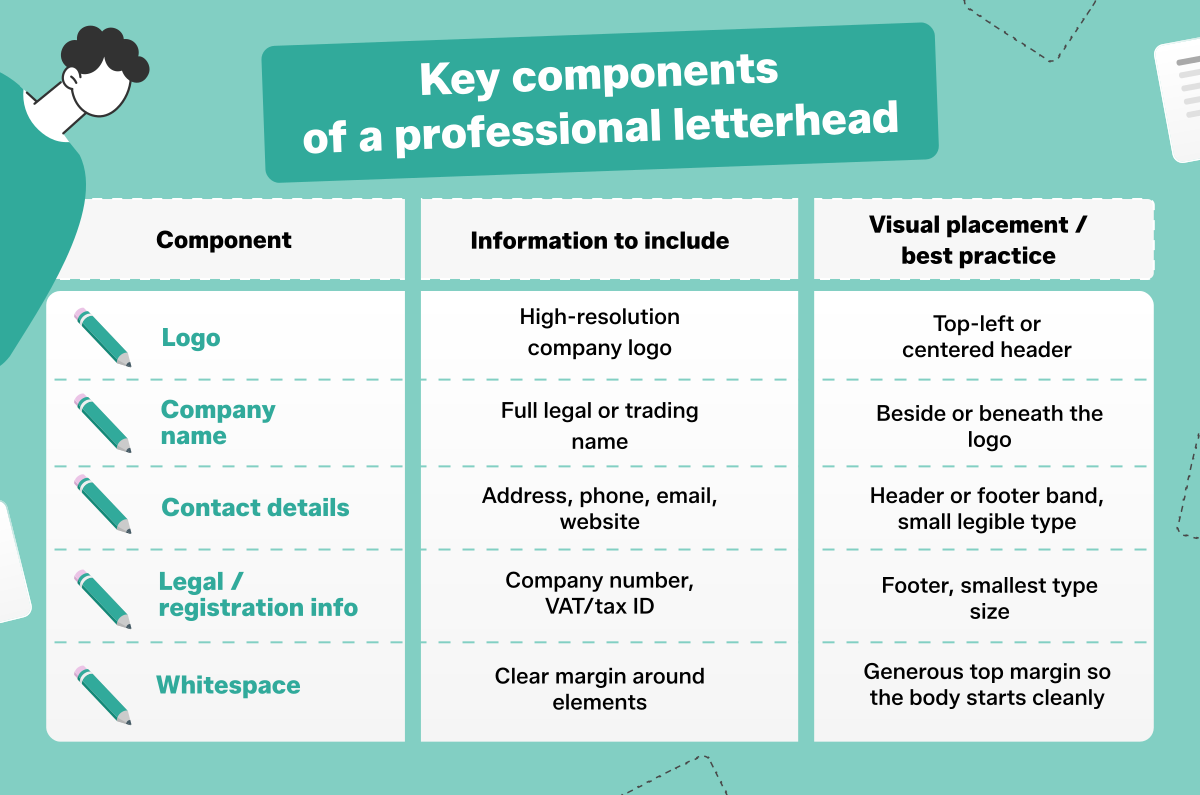
A strong letterhead is a small set of elements arranged with intent. Here are the essential parts of a letterhead and where each piece typically sits.

Component Information to include Visual placement / best practice
Logo High-resolution company logo Top-left or centered header
Company name Full legal or trading name Beside or beneath the logo
Contact details Address, phone, email, website Header or footer band, small legible type
Legal / registration info Company number, VAT/tax ID Footer, smallest type size
Whitespace Clear margin around elements Generous top margin so the body starts cleanly

What is a letterhead used for? (Common business use cases)

So what is a letterhead for a business, day to day? Letterheads appear anywhere an organization needs to communicate with authority, in both printed and digital form.

Formal external business correspondence

Letterheads lend authority and trust to client proposals, cover letters, formal notices, B2B announcements, and official press releases. When a recipient sees a familiar, professional header, the message reads as official rather than casual — which is exactly the impression these documents need to make.

Many documents are expected, and sometimes required, to appear on official letterhead: invoices, receipts, employment offer letters, law firm filings, medical records, and corporate board meeting minutes. Here the letterhead is not just branding — it is part of how the document's authenticity is judged.
Technical document specifications & layout rules

A letterhead that looks great on screen but prints with clipped edges undermines the professionalism it is meant to convey. These specifications keep it clean in both worlds.

Standard dimensions and margins

Getting the letterhead size and overall letterhead format right is what ensures the design prints cleanly on paper and displays correctly on screen.

  • North America: US Letter size (8.5 × 11 inches).
  • International / Europe: A4 paper size (210 × 297 mm).
  • Margin rules: set top margins to at least 1.5 to 2 inches to leave ample room for header elements, and keep left and right margins at a standard 0.75 to 1 inch.

Color profiles and typography

  • Color modes: use CMYK color profiles for physical press printing, and RGB color profiles for digital web templates.
  • Font choice: limit typography to 1 or 2 brand fonts. Set contact details in a clear, highly legible sans-serif or serif typeface at 8 to 10 pt.

Electronic letterheads (e-Letterheads) & security protocols

Most letterheads now live as digital templates, which introduces both convenience and a set of security concerns competitors often skip.

Setting up digital header/footer boundaries

To build an electronic letterhead (e-Letterhead) inside a word processor, place your logo and contact blocks within the designated Header and Footer document bands rather than in the body. Anchoring assets there locks them in place, so multi-page body text can grow without shifting your corporate branding out of position. When the letter is ready to send, convert Word to PDF so the header and footer render identically on every recipient's screen.

Preventing letterhead fraud and document spoofing

An official letterhead is also a target for forgery, so protect it:

  • PDF flattening: never send official letterhead documents as editable word-processor files (.docx). Always export or save as a flattened PDF to prevent unauthorized editing of your company details.
  • Digital signatures & QR verification: adding a cryptographic digital signature or embedding an authentication QR code in the footer verifies the document's authenticity and protects against identity spoofing. You can sign a PDF in the browser to add that layer of trust before sending.

Step-by-step: How to design a letterhead

Building a reusable letterhead is a short, repeatable process:

  1. Gather brand assets: prepare high-resolution vector logos (SVG or transparent PNG), your brand hex colors, and verified contact details.
  2. Select a layout style: choose a balanced header — a left-aligned logo with a right-aligned address, or a centered logo with the address in the footer. Starting from ready-made letter templates gives you a proven structure to adapt.
  3. Build the header and footer: input text into the designated document bands, keeping generous whitespace so the page never looks crowded.
  4. Save a master template: save the file as a reusable template (.dotx or a master document) for company-wide distribution.

Conclusion

A letterhead is an essential branding tool that bridges visual identity with legal communication. Combining clean design, accurate contact details, correct margin boundaries, and secure PDF exports guarantees that every business letter projects credibility and corporate authority. Once your design is set, keep it consistent across all your correspondence — OnlyDoc's professional document templates make it easy to reuse the same polished letterhead on every document you send.

Related articles