PDF vs. PDF/A: Key differences between file types
The difference between PDF and PDF/A becomes clear when comparing their design philosophies. Standard PDFs prioritize versatility and interactivity, while PDF/A files prioritize permanence and reproducibility. Here's how PDF vs. PDF/A breaks down:
| Feature | Standard PDF | PDF/A |
|---|
| Purpose | General use, sharing, collaboration | Long-term archiving and preservation |
| External Dependencies | Allowed (system fonts, linked resources) | Prohibited (all elements embedded) |
| Encryption | Fully supported | Restricted or prohibited |
| Multimedia | Audio, video, 3D computer graphics allowed | Not allowed |
| Transparency | Supported in all versions | Not allowed (PDF/A-1 through 3) |
| JavaScript | Allowed for forms and interactivity | Prohibited |
| Fonts | May reference system fonts | Must embed all fonts |
| Metadata | Optional | Required with strict schema |
While standard PDFs excel at dynamic workflows including fillable forms, clickable links, and embedded video, PDF/A files sacrifice these features for guaranteed long-term readability. A normal PDF might include JavaScript to calculate form totals automatically, but in 20 years, that script could fail if browser environments change. PDF/A eliminates this risk by stripping out any feature that introduces uncertainty.
You can use our PDF reader to inspect both file types directly in your browser without installing desktop applications. Open any PDF or PDF/A file to verify compliance, check which embedded fonts are present, and review document properties within seconds from any device.
The evolution of PDF/A: From v1 to v4
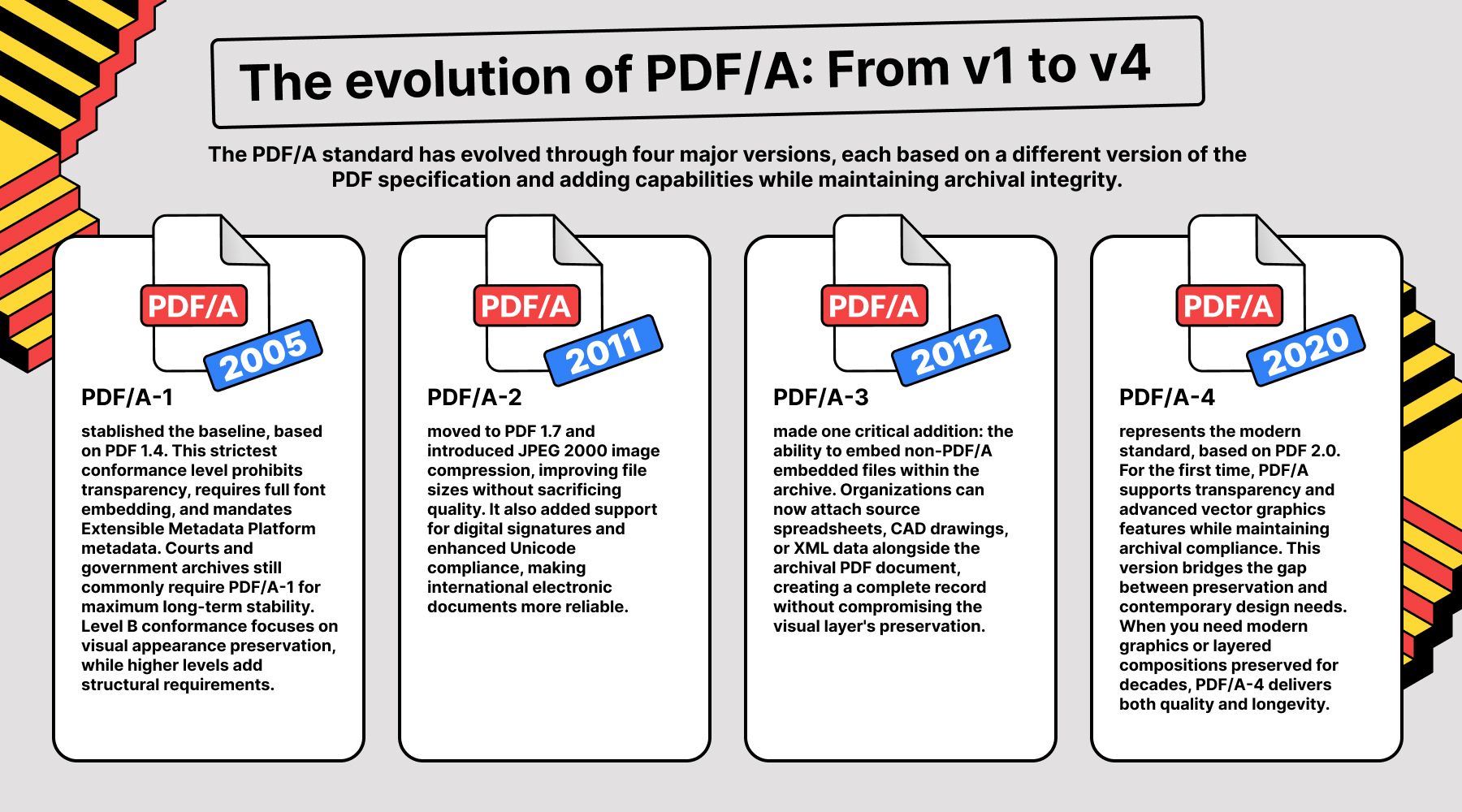
The PDF/A standard has evolved through four major versions, each based on a different version of the PDF specification and adding capabilities while maintaining archival integrity.
PDF/A-1 (2005) established the baseline, based on PDF 1.4. This strictest conformance level prohibits transparency, requires full font embedding, and mandates Extensible Metadata Platform metadata. Courts and government archives still commonly require PDF/A-1 for maximum long-term stability. Level B conformance focuses on visual appearance preservation, while higher levels add structural requirements.
PDF/A-2 (2011) moved to PDF 1.7 and introduced JPEG 2000 image compression, improving file sizes without sacrificing quality. It also added support for digital signatures and enhanced Unicode compliance, making international electronic documents more reliable.
PDF/A-3 (2012) made one critical addition: the ability to embed non-PDF/A embedded files within the archive. Organizations can now attach source spreadsheets, CAD drawings, or XML data alongside the archival PDF document, creating a complete record without compromising the visual layer's preservation.
PDF/A-4 (2020) represents the modern standard, based on PDF 2.0. For the first time, PDF/A supports transparency and advanced vector graphics features while maintaining archival compliance. This version bridges the gap between preservation and contemporary design needs. When you need modern graphics or layered compositions preserved for decades, PDF/A-4 delivers both quality and longevity.
Why your business needs PDF/A in 2026
Organizations increasingly recognize that archiving documents isn't optional but a legal, financial, and operational necessity. Three pillars drive adoption of the PDF/A format in modern business.
Legal compliance tops the list. Court systems worldwide mandate PDF/A for electronic filing because the format creates unchangeable records of submitted documents. When you file a brief or contract, the court must be able to open that exact document 10 years later during an appeal, with every font, image, and line break nearly identical to the original. PDF/A guarantees this reproducibility in ways standard PDFs cannot.
Tax integrity matters equally. The IRS and international tax authorities accept PDF/A for audit trails because the format ensures seven- to ten-year readability without software dependencies. A tax return submitted as PDF/A today will render consistently during a 2033 audit, regardless of which operating systems or applications have come and gone in the interim.
Knowledge management represents the third pillar. Corporate archives, patent filings, and research papers require a file format that survives software obsolescence. When a pharmaceutical company archives clinical trial data or a university library preserves doctoral theses, PDF/A provides the only reliable guarantee that these digital documents will remain accessible for future generations.
Beyond these traditional use cases, 2026 brings a new driver: AI integration. PDF/A's structural consistency makes it the preferred format for AI training datasets and automated data extraction. Machine learning models can reliably parse these files because the embedded structure doesn't shift between systems, which is a critical advantage for legal AI platforms, document intelligence tools, and automated compliance checking. When your AI needs to extract clauses from 10,000 archived contracts, PDF/A's self-contained structure ensures consistent, accurate results.
How to convert and manage PDF/A files online
Modern workflows no longer require desktop software installations to handle archival documents. Browser-based tools deliver the same capabilities with greater accessibility and cross-platform compatibility.
Opening PDF/A files in our PDF viewer lets you verify archival compliance directly in your browser. The tool displays document properties, confirms which fonts are embedded, inspects color profiles, and ensures no external dependencies exist. All of these are critical checks for organizations submitting files to courts, regulatory bodies, or long-term storage systems.
This approach eliminates installation friction. Rather than downloading software, configuring settings, and managing licenses, you simply upload the file and inspect it immediately. The workflow scales across devices so you can verify a contract on your desktop at the office, review a filing on your tablet during a commute, or check compliance on a shared computer without leaving behind any installation footprint. For teams managing hundreds of PDF/A submissions monthly, this browser-based convenience translates to significant time savings and reduced IT overhead.
The intelligent archive: AI, PDF/A, and digital documents
Archival documents present a unique challenge in 2026: they're notoriously long. A single property deed runs 100 pages, regulatory filings stretch to 200, and patent applications often exceed 300. Traditional archiving treated these documents as static long-term storage by filing them away and retrieving them verbatim when needed. Modern workflows demand more.
We've moved from simply storing documents to interacting with them intelligently. Semantic search lets legal teams find specific clauses across thousands of archived contracts without reading every page. AI summarization extracts key terms from 150-page compliance reports in seconds. Automated extraction feeds clean, structured data into machine learning pipelines for pattern recognition and risk analysis.
PDF/A's self-contained structure makes these intelligent workflows possible. When every font is embedded and every color profile is device-independent, AI models can parse files consistently across different systems and time periods. A contract archived in 2015 as PDF/A feeds into the same AI extraction pipeline as one created yesterday, because the underlying structure remains stable. This consistency is why organizations building document intelligence platforms increasingly prefer PDF/A for their training data and production archives.
The format isn't just preserving documents anymore but preserving them in a way that makes future AI processing reliable. When you archive a document as PDF/A-4 today, you're not just ensuring a human can read it in 2046. You're ensuring the AI tools of 2046 can extract, analyze, and summarize its contents with the same accuracy as systems do now.
| Requirement | Best PDF/A Version |
|---|
| Strict Legal/Tax | PDF/A-1 or 2 |
| Modern Graphics | PDF/A-3 or 4 |
| Global Storage | PDF/A-3 |
| Searchable Data | PDF/A-1 (with OCR) |
This intelligent archive approach represents the evolution of long-term preservation. Documents aren't simply locked away but remain queryable, summarizable, and analyzable throughout their lifecycle. Whether you're managing court records, tax documentation, or corporate knowledge bases, choosing PDF/A means choosing a format designed not just for storage but for sustained utility across decades of technological change. Visit OnlyDoc to explore tools that make managing PDF/A documents as straightforward as working with any other file format while maintaining the archival integrity that makes these documents valuable in the first place.

 Published Jun 16, 2026
  8 min read
  96 views