 Published Sep 16, 2026
  11 min read
  78 views
Have you ever wondered why Microsoft Word quietly switched from .doc to .docx, or why opening an old file suddenly triggers "Compatibility Mode"? You are not alone. On the surface the two look identical — both store text, images, and formatting — but under the hood their architecture, security model, and cloud performance are radically different. Understanding the doc vs docx distinction helps you keep files smaller, safer, and far easier to recover when something goes wrong. A question we hear a lot — is doc and docx the same file under two names? — has a clear answer: no, and the difference between doc and docx comes down to how each one is built. This guide breaks down what each Word document file type actually is, the technical differences that matter, and a practical trick for rescuing content from corrupted files.
DOC vs DOCX: Side-by-side comparison
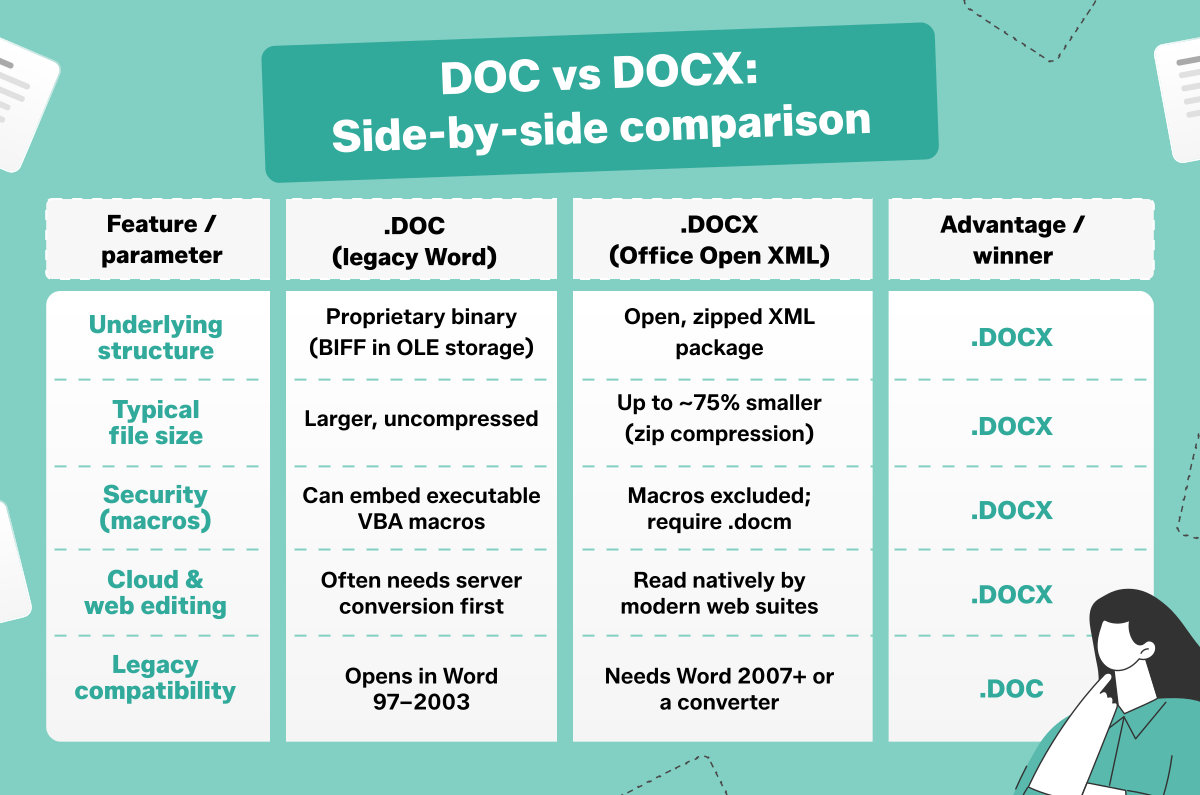
Before digging into the details, here is a direct comparison of the doc vs docx format across the parameters that affect everyday use — structure, size, security, and compatibility.
| Feature / parameter | .DOC (legacy Word) | .DOCX (Office Open XML) | Advantage / winner |
|---|---|---|---|
| Underlying structure | Proprietary binary (BIFF in OLE storage) | Open, zipped XML package | .DOCX |
| Typical file size | Larger, uncompressed | Up to ~75% smaller (zip compression) | .DOCX |
| Security (macros) | Can embed executable VBA macros | Macros excluded; require .docm | .DOCX |
| Cloud & web editing | Often needs server conversion first | Read natively by modern web suites | .DOCX |
| Legacy compatibility | Opens in Word 97–2003 | Needs Word 2007+ or a converter | .DOC |
What is a DOC file? About the legacy binary format
The .doc extension was the default file format for Microsoft Word from Word 97 through Word 2003. It relies on a proprietary Binary Interchange File Format (BIFF) encapsulated inside Microsoft's OLE (Object Linking and Embedding) Structured Storage — essentially a mini file system stored inside a single document. Because the format is binary rather than human-readable, third-party software historically struggled to parse and render .doc files accurately. Developers often had to reverse-engineer Microsoft's closed specification, which led to broken layouts, missing fonts, and inconsistent results when a document moved between applications.
That binary design also makes .doc files fragile. Text, formatting, and images are woven into a single dense stream, so if even a small part of the file is damaged during a transfer or a bad save, the whole document can become unreadable with no easy way to peek inside and recover the contents. It is precisely this "all or nothing" structure that the newer format was built to replace.
What is a DOCX file? The Office Open XML standard
The .docx format arrived with Microsoft Office 2007 and is standardized internationally under ISO/IEC 29500. The "X" stands for XML (Extensible Markup Language), a structured, text-based way of describing content and formatting. Crucially, .docx is an open standard: any web application or even a plain text editor can read and generate the document structure without licensing proprietary technology. This openness is exactly why is docx a word document that works so smoothly across Google Docs, mobile apps, and cloud storage, where .doc files often stumble.
Inside every .docx package, the content is split into separate, tidy parts: document.xml holds the body text, styles.xml stores formatting rules, and a media folder keeps images as standalone files. Because each element is isolated, a single damaged component rarely takes down the whole document — and any compliant program can open the file without guessing at Microsoft's internals. That interoperability is why .docx has become the universal exchange format for modern offices, schools, and web platforms alike.